
FAQ
게시판 내용 입력 및 파일첨부에 개인정보가 포함될 경우 개인정보가 유출되어 악용될 수 있으니 주의하시기 바랍니다.
개인 이메일 주소 및 휴대폰 번호 학교시스템에 입력 방법(How to Enter Your Personal Email Address and Phone Number into the School System)
작성자
국제교류원
작성일
2025-10-27 15:25
조회
401
비밀번호를 잊어버렸을 때 즉시 찾을 수 있도록, 반드시 개인 이메일과 전화번호를 학교 시스템에 빠르게 등록하시기 바랍니다. 등록 방법은 다음과 같습니다: 학교 웹사이트 접속: www.dyu.ac.kr
1. 홈페이지에서 "학사인트라넷"을 찾아 클릭합니다.
2. ID란에 학번을, PW란에 비밀번호를 입력합니다. 초기 비밀번호는 생년월일 6자리(형식: YYMMDD, 예: 2000년 11월 15일생 학생은 001115)입니다. 이미 변경한 경우에는 변경된 비밀번호를 입력합니다.
3. 학번과 비밀번호 입력 후 "로그인" 클릭
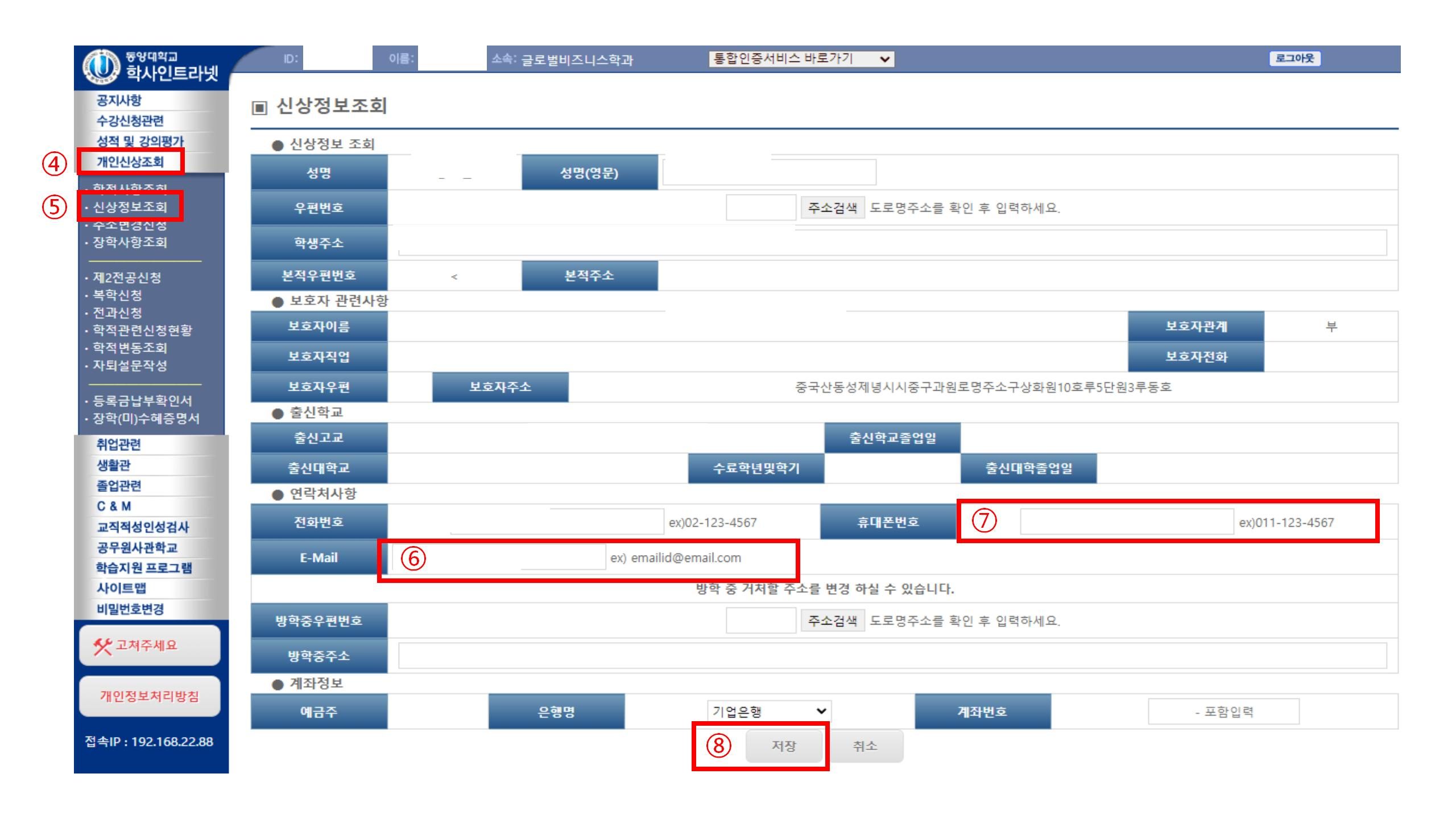
4. "개인정보조회" 클릭
5. "신상정보조회" 클릭
6. "E-mail"란에 본인이 주로 사용하는 이메일 주소 입력
7. "휴대폰번호"란에 본인 한국 휴대폰 번호 입력
8. "저장" 클릭하여 정보 저장
**이메일 주소나 전화번호가 변경될 경우, 반드시 학교 웹사이트에 로그인하여 정보를 최신으로 업데이트하시기 바랍니다.
To ensure that you can promptly recover your password if you forget it, please enter your personal email address and phone number into the school system as soon as possible. The steps are as follows:
1. Log in to the school website: www.dyu.ac.kr
2. On the homepage, find "학사인트라넷" and click to enter.
3. Enter your student ID in the ID field and your password in the PW field. The initial password is your 6-digit date of birth (format: YYMMDD; for example, if your birthday is November 15, 2000, the password is 001115). If you have already changed your password, please enter your updated password.
4. After entering your student ID and password, click "로그인".
5. Find and click "개인정보조회".
6. Click "신상정보조회".
7. Enter your frequently used email address in the "E-mail" field.
8. Enter your Korean mobile phone number in the "휴대폰번호" field.
9. Click "저장" to save your information.
**If your email address or phone number changes, please make sure to log in to the school website and update your information promptly.
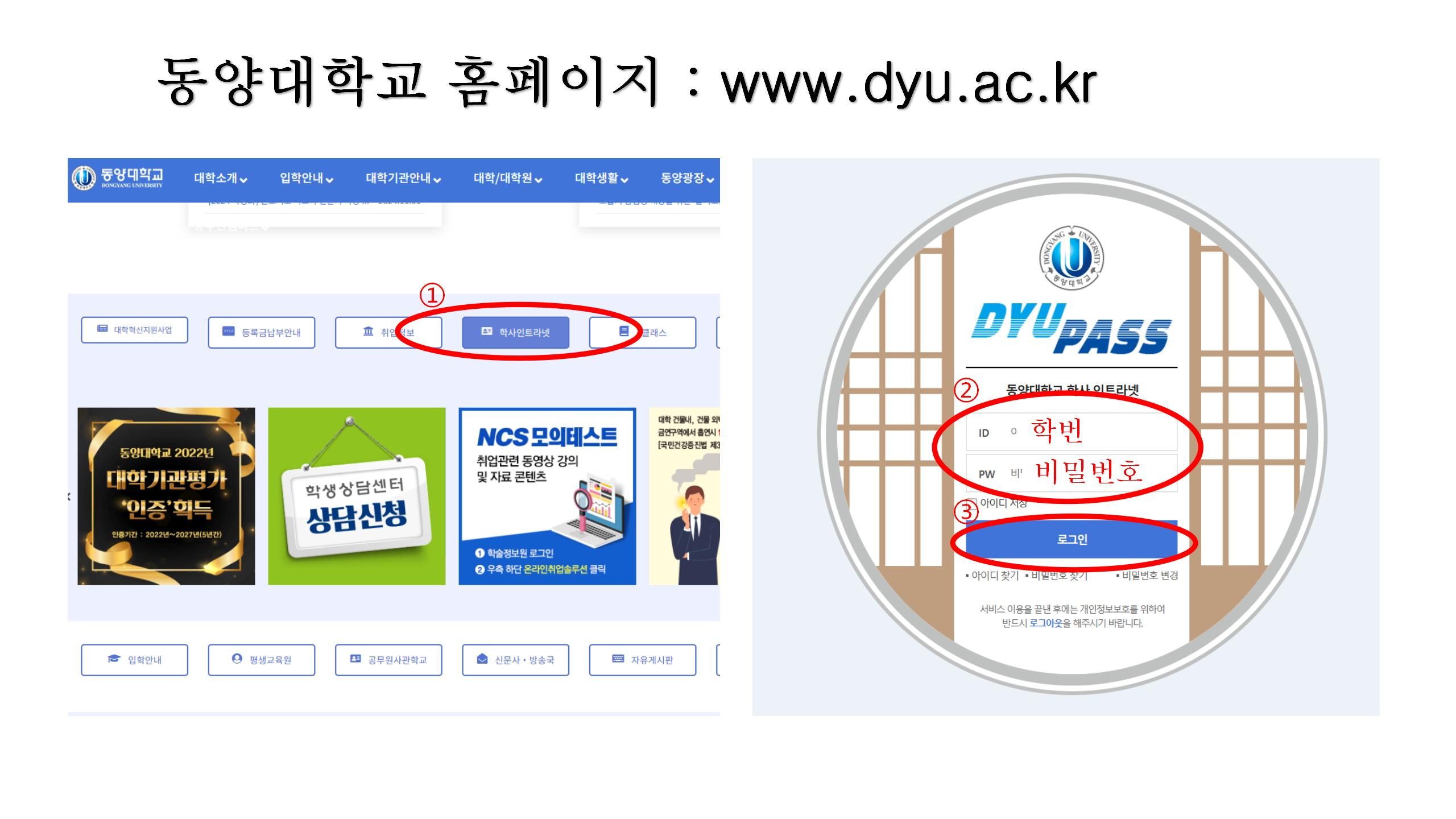
1. 홈페이지에서 "학사인트라넷"을 찾아 클릭합니다.
2. ID란에 학번을, PW란에 비밀번호를 입력합니다. 초기 비밀번호는 생년월일 6자리(형식: YYMMDD, 예: 2000년 11월 15일생 학생은 001115)입니다. 이미 변경한 경우에는 변경된 비밀번호를 입력합니다.
3. 학번과 비밀번호 입력 후 "로그인" 클릭
4. "개인정보조회" 클릭
5. "신상정보조회" 클릭
6. "E-mail"란에 본인이 주로 사용하는 이메일 주소 입력
7. "휴대폰번호"란에 본인 한국 휴대폰 번호 입력
8. "저장" 클릭하여 정보 저장
**이메일 주소나 전화번호가 변경될 경우, 반드시 학교 웹사이트에 로그인하여 정보를 최신으로 업데이트하시기 바랍니다.
To ensure that you can promptly recover your password if you forget it, please enter your personal email address and phone number into the school system as soon as possible. The steps are as follows:
1. Log in to the school website: www.dyu.ac.kr
2. On the homepage, find "학사인트라넷" and click to enter.
3. Enter your student ID in the ID field and your password in the PW field. The initial password is your 6-digit date of birth (format: YYMMDD; for example, if your birthday is November 15, 2000, the password is 001115). If you have already changed your password, please enter your updated password.
4. After entering your student ID and password, click "로그인".
5. Find and click "개인정보조회".
6. Click "신상정보조회".
7. Enter your frequently used email address in the "E-mail" field.
8. Enter your Korean mobile phone number in the "휴대폰번호" field.
9. Click "저장" to save your information.
**If your email address or phone number changes, please make sure to log in to the school website and update your information promptly.
전체 0개